In September 2017, astronomers spotted something that had never been seen before: an object from outside our solar system passing through. They named it 1I/’Oumuamua. Two years later came 2I/Borisov. And now, in 2025, a third interstellar visitor is on approach: 3I/ATLAS (C/2025 N1).
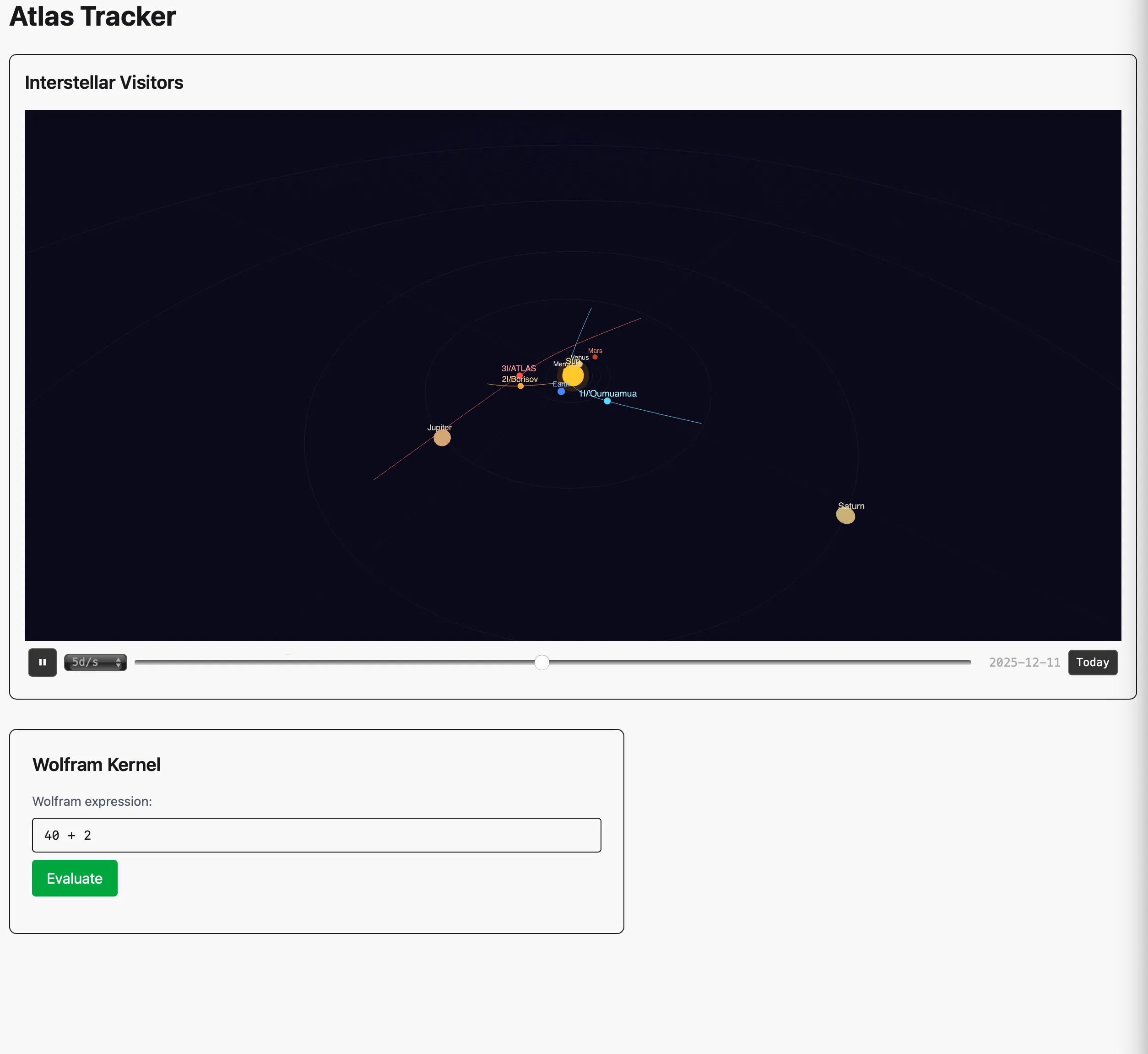
I wanted to track it. Not with a telescope, but with code. A real-time 3D visualization of the solar system showing where these objects are, where they’ve been, and how their trajectories compare. The stack I reached for might surprise you: Elixir, Wolfram Language, and a library I had to write from scratch to make them talk to each other.
The problem with connecting Elixir to Wolfram
Wolfram Language is exceptional at computational astronomy. Its AstronomicalData functions, symbolic math, and built-in knowledge base are hard to beat. But there’s no official Elixir client. The Wolfram Kernel speaks a binary protocol called WXF (Wolfram eXchange Format), and the only libraries that parse it are in Python and Java.
So I built one: ex_wxf, a pure Elixir library for encoding and decoding WXF. It handles the full type system: integers, reals, strings, symbols, packed arrays, associations, and the recursive function expressions that Wolfram uses for everything.
The interesting part was the binary parsing. WXF is a compact format where each value is prefixed by a type byte, and composite expressions declare how many parts they contain. Pattern matching made this clean:
defp decode_element(<<0x22, rest::binary>>) do
  # IEEE 754 double-precision float
  <<value::float-little-size(64), rest::binary>> = rest
  {value, rest}
end

defp decode_element(<<0x23, rest::binary>>) do
  # Packed array - bulk numerical data
  {rank, rest} = decode_varint(rest)
  {dimensions, rest} = decode_dimensions(rest, rank)
  # ... decode flat array of values
end
Elixir’s binary pattern matching is almost unfairly well-suited for this kind of protocol work. What would be dozens of lines of bit-shifting in most languages becomes a clear, declarative pattern.
OTP as mission control
The core architecture is an OTP supervision tree. The Wolfram Kernel runs as a system process managed by a GenServer through Elixir’s Port:
defmodule AtlasTracker.KernelWorker do
  use GenServer

  def init(opts) do
    kernel_path = Application.get_env(:atlas_tracker, :wolfram_kernel_path)
    port = Port.open({:spawn_exec, kernel_path}, [:binary, :exit_status, :stderr_to_stdout])

    # Pre-warm: wait for the kernel to be ready
    warm_up(port)
    {:ok, %{port: port, caller: nil, buffer: ""}}
  end
end
The GenServer wraps a WolframKernel OS process, serializes evaluation requests, and parses responses using start/end markers injected via WriteString. It sits in the supervision tree alongside the Phoenix endpoint, so if the kernel crashes, the supervisor restarts it automatically. No manual process management, no zombie processes.
This is where OTP shines. The Wolfram Kernel is stateful, long-lived, and expensive to start. Wrapping it in a GenServer gives us:
- Serialized access, one evaluation at a time, no race conditions
- Crash isolation, a bad Wolfram expression can’t take down the web server
- Automatic recovery, supervisor restarts the kernel on failure
- Pre-warming, the kernel is ready before the first request hits
Fetching real ephemeris data
For trajectory data, I use JPL Horizons, NASA’s ephemeris service. It provides state vectors (position and velocity) for any solar system body, including comets and interstellar objects. The client is straightforward:
defmodule AtlasTracker.HorizonsClient do
  def fetch_state_vectors(object, start_time, stop_time, step_size) do
    Req.get("https://ssd.jpl.nasa.gov/api/horizons.api",
      params: %{
        COMMAND: "'#{object}'",
        EPHEM_TYPE: "VECTORS",
        CENTER: "'500@10'",
        START_TIME: start_time,
        STOP_TIME: stop_time,
        STEP_SIZE: step_size,
        VEC_TABLE: "1"
      }
    )
  end
end
The response comes back as plain text with position data between $$SOE and $$EOE markers. A parser extracts X/Y/Z coordinates (in km) and converts them to AU, along with calendar dates for each epoch.
On page load, LiveView fires off three parallel requests, one for each interstellar object:
@interstellar_objects [
  %{id: "3i_atlas",    object: "C/2025 N1", start: "2025-07-01", stop: "2026-06-01"},
  %{id: "1i_oumuamua", object: "1I",        start: "2017-06-01", stop: "2018-06-01"},
  %{id: "2i_borisov",  object: "2I",        start: "2019-06-01", stop: "2020-06-01"}
]

def mount(_params, _session, socket) do
  if connected?(socket) do
    for obj <- @interstellar_objects do
      Task.start(fn ->
        result = HorizonsClient.fetch_state_vectors(obj.object, obj.start, obj.stop, "7d")
        send(pid, {:trajectory_result, obj.id, obj.label, result})
      end)
    end
  end
end
Each result arrives independently and gets pushed to the browser as it’s ready. No waiting for all three to finish before rendering.
3D rendering through LiveView hooks
The visualization uses Three.js, but there’s no npm in this project. The Three.js module lives in assets/vendor/ and gets bundled by esbuild. The 3D scene is a LiveView hook that manages its own WebGL renderer:
const SolarSystem = {
  mounted() {
    this._scene = new THREE.Scene()
    this._camera = new THREE.PerspectiveCamera(60, ...)
    this._renderer = new THREE.WebGLRenderer({ antialias: true })

    // Listen for trajectory data pushed from LiveView
    this.handleEvent("trajectory_data", ({ id, label, positions }) => {
      this._addTrajectory(id, label, positions)
    })
  }
}
The bridge between Elixir and JavaScript is push_event on the server side and handleEvent on the client. LiveView manages the connection, and the hook manages the 3D state. Clean separation.
Keplerian orbits, not circles
Early versions drew planet orbits as simple circles. That’s fine for a demo, but once you’re comparing real trajectory data against them, the approximation becomes distracting. Mars at 0.09 eccentricity is noticeably non-circular.
The fix was implementing actual Keplerian orbital mechanics in JavaScript. Each planet carries its J2000 orbital elements:
const PLANETS = [
  { name: "Mercury", a: 0.387, e: 0.2056, i: 7.005, omega: 48.331, w: 29.124, M0: 174.796, ... },
  { name: "Earth",   a: 1.000, e: 0.0167, i: 0.000, omega: -11.261, w: 114.208, M0: 357.529, ... },
  // ...
]
For any given date, the code solves Kepler’s equation using Newton iteration to find the eccentric anomaly, converts to true anomaly, and computes the 3D position through three rotational transforms (argument of perihelion, inclination, longitude of ascending node). The planets are in their correct positions for whatever date the time slider shows.
Synchronized replay across decades
There’s a problem with comparing three interstellar objects: they visited years apart. 1I/’Oumuamua passed through in 2017, 2I/Borisov in 2019, 3I/ATLAS in 2025. A single timeline would mean two of the three are always frozen.
The solution is normalized replay. The slider represents progress from 0% to 100% through each object’s own observation window simultaneously. At 50%, you see 1I/’Oumuamua in December 2017, 2I/Borisov in December 2019, and 3I/ATLAS in December 2025, all at the midpoint of their respective passes. The planet positions track 3I/ATLAS’s date since it’s the current visitor.
Hit play and all three markers sweep through the solar system together, each following their real trajectory data at proportional speed. You can scrub to any point and compare approach angles, depths, and proximity to the inner planets side by side.
What the three trajectories reveal
Seeing all three interstellar trajectories animate on the same 3D model is striking. 1I/’Oumuamua came in steep, almost perpendicular to the ecliptic plane, and left just as fast. 2I/Borisov had a more conventional approach angle but passed well outside Earth’s orbit. 3I/ATLAS is threading a different needle entirely.
These aren’t approximations. They’re real state vectors computed by NASA’s ephemeris service, rendered at their actual heliocentric coordinates. The Wolfram kernel sits behind the scene ready for deeper analysis: computing close-approach distances, fitting orbital elements, or evaluating any expression you type in.
Trade-offs and honest assessment
This stack is not for everyone. Running a local WolframKernel requires a Wolfram license. The ex_wxf library is young. The Three.js scene is vanilla, without the ecosystem of React Three Fiber or similar. And the planet positions, while based on real orbital elements, don’t account for perturbations from other planets.
But for a project that bridges computational mathematics with web visualization, Elixir’s strengths compound. Binary protocol parsing with pattern matching. Process isolation through OTP. Real-time data push through LiveView. Each piece does what it’s good at, and the supervision tree keeps it all running.
The code is at atlas_tracker if you want to track 3I/ATLAS yourself. You’ll need a WolframKernel, an internet connection for Horizons, and mix phx.server. The interstellar visitors are already on their way.